Multiline IconsGenerate a matching set with AI
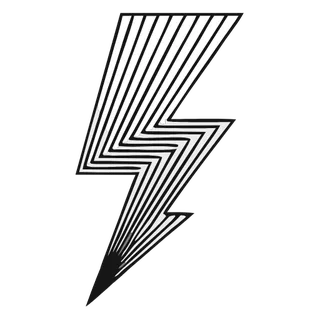
Multiline icons draw each object with several strokes instead of one — parallel offsets, interior detail lines, and secondary contours that add density without fills. The result sits between minimal line icons and full illustration: still airy, but visibly engineered.
When to use multiline icons
Multiline styles reward products that want line-icon cleanliness with more visual interest: fintech dashboards, hardware companies, technical documentation, and hero sections where a plain line icon looks too sparse at 64px and up. The extra strokes give big icons something to say. At small toolbar sizes the detail lines merge, so multiline sets are best deployed at display sizes with a simpler variant for chrome.
Best for
- Hero and feature sections
- Hardware and IoT products
- Technical documentation
- Fintech dashboards at display sizes
- Print collateral
Example prompts
Paste one of these into the generator, or describe your own theme — every icon in the batch comes out in the same multiline style.
Frequently asked questions
How is multiline different from regular line icons?+
Line icons commit to one stroke doing all the work. Multiline icons layer parallel strokes and interior detail lines, trading some minimalism for density and craft. Think of it as line iconography with a second and third pass of detail.
What sizes do multiline icons need?+
The detail pays off from about 32px upward and shines at 64–128px in feature grids. Below 24px the parallel lines start to fuse; that is the moment to swap in a single-stroke companion set generated from the same item list.
Related styles

Popular uses for multiline icons
Guides with specs, workflow tips, and prompts for the jobs this style handles best.
Keep reading
Make your multiline icon set
Describe a theme, pick the Multiline preset, and get a consistent set of up to 50 icons — exported as clean, editable SVG. Free to start, no credit card required.
Start generating — it's free